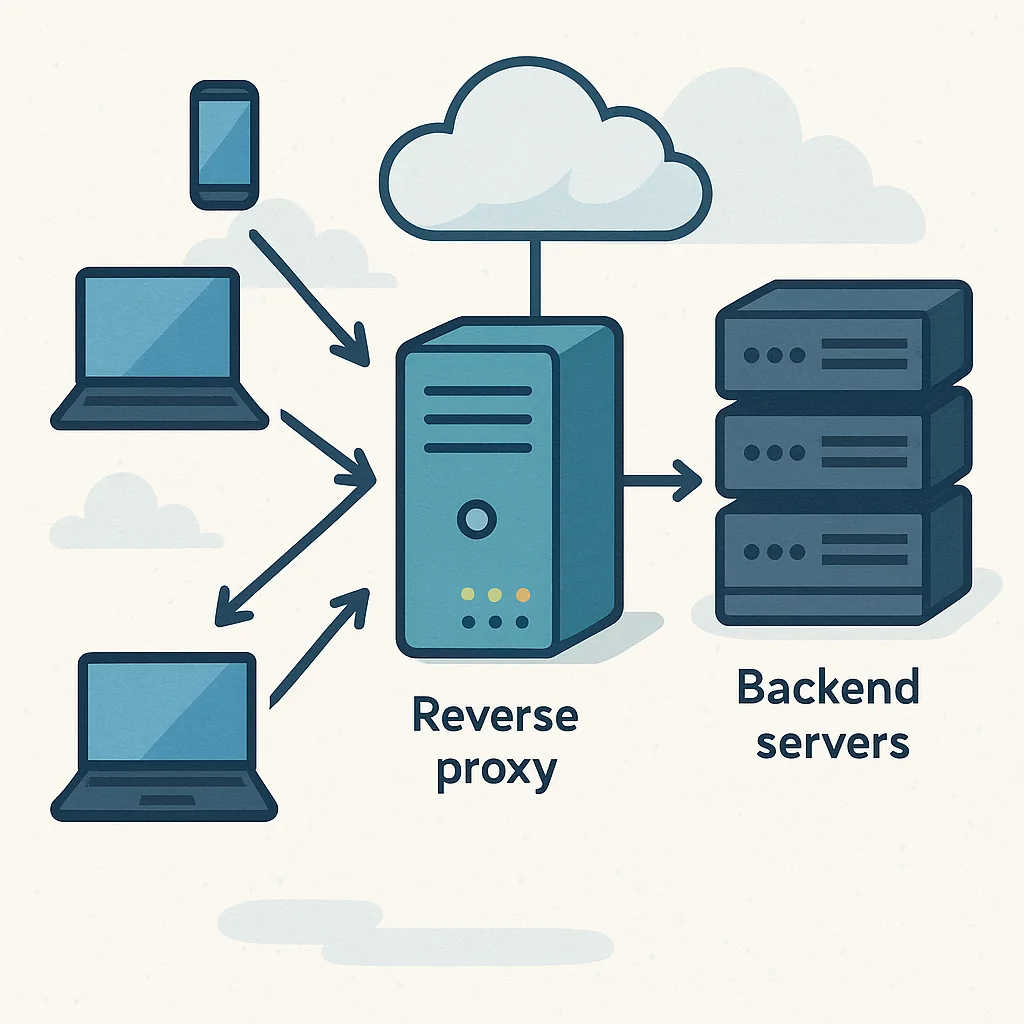
what a reverse proxy is (educational) — practical tips and tricks for infrastructure operators.
A reverse proxy sits between clients and one or more backend servers and forwards client requests to the appropriate service while returning responses to the clients. At a high level it looks like a middle layer that hides the actual servers from direct access, and this provides a number of operational advantages. For readers who manage web infrastructure, understanding what a reverse proxy is (educational) is useful before you deploy one, and this guide focuses on pragmatic tips you can apply immediately.
The primary benefits of a reverse proxy include centralised TLS termination, load distribution, caching, request filtering and the ability to host multiple services under a single address. TLS termination at the proxy reduces certificate management complexity on backend machines, while caching can significantly reduce load by serving static or semi-static responses from the proxy. Reverse proxies also provide a convenient place to implement rate limiting, IP allowlists, and basic DDoS mitigation before traffic reaches application servers.
When configuring a proxy, pay attention to client identity and headers. Preserve or add X-Forwarded-For and X-Forwarded-Proto headers where needed, and ensure backend services trust the proxy rather than interpreting the source IP as the client IP. Be explicit about proxy protocol support if you use TCP-level forwarding for non-HTTP traffic. Adjust timeouts and buffer sizes to match the behaviour of your applications, and avoid default values that may be fine for small sites but problematic for long-polling or streaming endpoints.
- Treat TLS as a first-class concern; automate certificate renewal and prefer strong cipher suites and TLS 1.2 or newer.
- Configure health checks for each backend so the proxy removes unhealthy instances from rotation automatically.
- Use caching selectively; cache static assets and expensive API responses where freshness requirements allow.
- Log at the proxy for a global view of incoming traffic and correlate with backend logs for tracing.
- Test WebSocket and HTTP/2 support if your application relies on them, as not all proxies forward these protocols identically.
Pick a proxy that matches your operational model and scale. Lightweight proxies such as nginx are widely used for TLS termination, static caching and basic load balancing, while specialised proxies like HAProxy and Envoy provide advanced load-balancing algorithms, circuit breaking and observability features. Container-oriented solutions such as Traefik integrate well with dynamic service registries and orchestration platforms, which can reduce configuration overhead in rapidly changing environments. Whatever you choose, keep configuration declarative and version controlled so changes are auditable and reversible.
Instrumentation and monitoring are essential for keeping a reverse proxy healthy. Expose metrics such as request rates, latencies, error codes and connection counts to your monitoring system, and create alerts for sustained error spikes or resource exhaustion on the proxy host. Centralise logs and enable structured logging if possible to make automated analysis and tracing easier. Health checks on backends should be tuned to avoid flapping; use short, frequent checks for fast detection combined with sensible thresholds for removal and reinstatement of instances.
Be aware of common pitfalls to avoid when implementing a reverse proxy. Misconfigured header handling can break application logic that expects original client information, while inappropriate cache lifetimes can serve stale content to users. Single points of failure matter; if you run only one proxy instance, consider active-passive failover or an IP failover mechanism, and plan capacity for peak load to avoid overloading the proxy. Finally, test your configuration under realistic conditions, including abrupt backend failures and large numbers of concurrent connections, to ensure graceful degradation and clear failure modes.
To continue learning practical Infrastructure techniques and find more configuration examples and checklists, see related Infrastructure posts on the blog by following this link to the Infrastructure label at Build & Automate: Infrastructure posts. Start with a small, well-tested deployment, automate certificate and configuration management where possible, and incrementally add features such as caching and rate limiting so you can measure their impact on performance and reliability. For more builds and experiments, visit my main RC projects page.
Comments
Post a Comment